Monday, 1 April 2013

Dione Blogger Template 2013

0 comments
Dione Blogger Template is a new gallery style awesome blogger template.This template is specially designed for picture/wallpapers blogs.However you can use it for any purpose,dione blogger has four columns layout.It has a fantastic header along with three columns footer.This template has social subscription widget along with beautiful search box.This template has white and gray color which makes it more attractive template.This template works with all type of browsers i.e Internet Explorer,Google Chrome,and Mozilla Firefox.You Can Download it free from Our Blog.
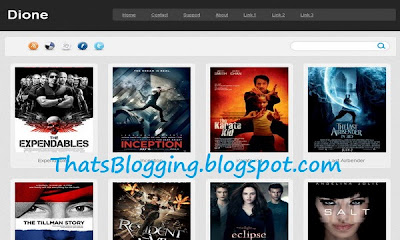
Dione Blogger Template 2013


Live Demo  Download Link


Features of Dione Blogger Template 2013

  • 4 Columns layout
  • 3 Columns footer
  • Social Subscription Widget
  • Magazine Style
  • Black
  • White
  • Gray
  • Pro style Blogger Template
  • Elegant
  • Beautiful Navigation menu
  • Auto post
  • Professional Look
  • Work with all browsers.

Extra Information About Dione Blogger Template 2013

Dione Blogger template is elegant style blogger template,it has many features which has been mentioned above.Actually this template is design by Lasantha Bandara who is admin at BloggerTipsandTricks.I will suggest this template for wallpapers blog,however we are not convincing you.You can use it for any type blog.Now time to install this template,if you are new blogger and can,t install Blogger Template so read the Below instructions.

So what's up:- Did You like this Template?Oh no its not Good? no it doesn't suit my Blog?Any Idea you can share with us :),Stay blessed,Happy Blogging.

Beautiful Recent Comments Widget For Blogger

0 comments
Beautiful Recent Comments Widget For Blogger

Beautiful Recent Comments Widget : We have found a new beautiful Comments widget which will help update you about new recent comments on your Blog/Website Contents/articles.This widget is very simple and clean Blogger Widget,it will not effect your blog loading speed.This recent comments widget will be at the blog sidebar.This widget will surely show the last comments along with the title of the post.So if you are interested in adding this widget follow the below easy steps.

Live Demo of Recent Comments Widget

How to add Beautiful Recent Comments Widget To Blogger

Adding recent comment widget will help you to encourage your visitors to leave comments on your blog contents.Adding this Widget is very easy,you just have to copy a snippet of JavaScript and add into the layout section.
  • Go to Blogger.com
  • Sign in there and visit Blogger Dashboard.
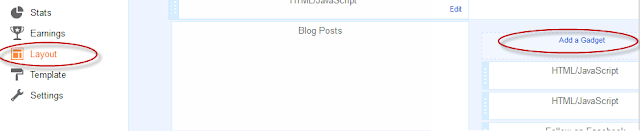
  • Now Click On Layout and the click on add a widget/gadget ( as shown below in the picture).
recent-comments-widget
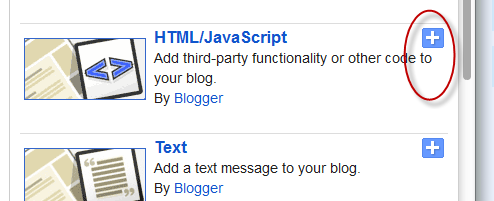
  • Now When you click on Add a Gadget a box will popup Select HTML/JavaScript from that Box(as Shown)
Html/JavaScript
  • Now Copy the below Code/Script and replace "Blog-Link" With your Own Blog URL and paste it into HTML/JavaScript Box.
<script style=text/javascript src="http://helplogger.googlecode.com/svn/trunk/recent comments widget.js"></script><script style=text/javascript >var a_rc=5;var m_rc=false;var n_rc=true;var o_rc=100;</script><script src=Blog-Link/feeds/comments/default?alt=json-in-script&callback=showrecentcomments ></script><span id=rcw-cr><a href=http://thatsblogging.blogspot.com>Recent Comments Widget</a></span><style type=text/css> .rcw-comments a {text-transform: capitalize;} .rcw-comments {border-bottom: 1px dotted; padding-top: 7px!important; padding-bottom: 7px!important;} #rcw-cr {font-family: Arial,Tahoma;font-size:9px;padding-top:7px;display:block;} </style>
Script Credit Goes to HelpLogger 
  • Now Just hit save and that's it :)
So What's Up:- Recent Comments Widget is a beautiful Blogger widget,actually it will show the latest comments on your blog articles.This widget is very clean and simple,i hope you will love it,If you have any question,so just ask it we are here to answer you :),stay blessed,Happy Blogging .

Saturday, 30 March 2013

Medialink Wireless N USB Adapter Review

0 comments
MediaLink is pioneer in offering the ultimate Wi-Fi solutions, Wireless USB adapters and related items. Their product "Wireless N USB adapter" has recently hit the #2 spot in the best sellers at the Amazon store which shows how much popular their products are.

Let's have a look at the MediaLink Wireless N USB Adapter (MWN-USB150N):

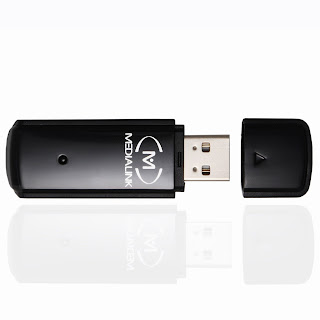
Medialink Wireless N USB Adapter Review
The MWN-USB150N model ic fully compatible with the 802.11n (Draft 2.0), 802.11b and 802.11g standards. The adapter is capable of providing the full speed and coverage standards because of its state of the art technology and it is the best adapter available in the market. Maximum Wireless transmission rates is approximately 150Mbps. The device uses the latest MIMO technology, due to which it has two internal Intelligent Antennas capable of providing the ultimate wireless performance, transmission rates and stability. Built-in functions automatically avoid channel conflicts.

It is very easy to install the MWN-USB150N and even the most novice users can install the product easily. All you have to do is to insert the CD and click on install software. Then the utility will auto detect the device and you are ready to use. You don't need to worry about the compatibility issues because it is fully compatible with all brands of Wi-Fi routers.


Don't take the MediaLink Wireless adapter as just the ordinary adapters present in the market, it is certified by Microsoft to ensure the maximum compatiblity with the available operating systems such as Window 200, XP and Vista.


The adapter offers state of the art security encryption including 64/128/152-bit wep, WPAWPA2 and WPA-PSK/WPA2-PSK encryption.


You will get all these items with the product:


Medialink- 150Mbps Wireless N USB Adapter - 802.11n, 2.4ghz, Windows 2000 / 2003 / XP 32-Bit and 64-Bit / Vista 32-Bit and 64-Bit / Windows 7 32-Bit and 64-Bit Compatible
Buy Now:
List Price: $65
Price: $14.99 only, you will save $51.
Buy: Click Here to buy the product from Amazon.

Friday, 29 March 2013

iPhone Wallpapers Blogger Template

0 comments
iPhone Wallpapers Blogger Template

iPhone Wallpapers Blogger Template is a new awesome Gallery style Blogger Template.Actually this template is specially design for Wallpapers Blog.This Template is designed by Lasindu Nadishan and its author is CoolBthemes.This Template is SEO Ready Template.It has one right sidebar which makes it more attractive template.It has black background.It has beautiful social sharing buttons which will help you to get more likes,tweets and pins.This template has 2 columns layout along with beautiful header.iPhone Wallpapers Blogger Template works with all type of Browsers such as Google Chrome,Internet Explorer and Mozilla Firefox etc.You Can easily download this template from Our Blog.

Download Link credit Goes to CoolBthemes

Features of iPhone Wallpapers Blogger Template

  • SEO Ready
  • Ads Ready
  • 2 Columns
  • Top menu
  • Right Sidebar
  • Social Share buttons
  • Works with all Browsers
  • Dark
  • Black
  • Gallery Style
  •  Beautiful Page Navigation

Extra Information for Wallpapers Blogger Template

iPhone Wallpapers Blogger template is specially designed for Wallpapers blogs,however you can use it for any blogs.iPhone Wallpapers Blogger Template has many beautiful features,every picture is framed in an iPhone.Different social sharing buttons makes it more cool template.Now time to install this template.If you can,t install this template just read the below article and install this template easily to your Blog.

So What's Up:- Share your ideas about this template with us,if you have any question,ask freely,we are here to answer you :),Stay Blessed , Happy Blogging.

Thursday, 28 March 2013

Wikipedia Search Box Widget For Blogger

0 comments
wikipedia-logo
image Source
I just get bore of search boxes,you may have seen many search boxes,but recently Blogger has introduce a Beautiful Wikipedia Search Box for Blogs.Actually this Search Box will help the visitors to easily search any related contents or any idea in his/her mind.This search box is actually the Wikipedia Search Box,and as we all know that Wikipedia is an ocean of  Knowledge,so One can get alot of knowledge.This search box will help your blog visitors to easily search Wikipedia articles without leaving your blog/website.I will suggest this widget for informative blogs or blog related to knowledge etc .However you can add this widget any where in the blog.


How To Add Wikipedia Search Box Widget To Blogger

Adding Wikipedia Search Box is very easy,you have to add a widget from Blog Layout Section and that's it so let's see how to do this.

  • Sign in to your blogger account
  • Now Click On layout
  • Now Click On Add a Gadget/Widget
  • A Box will pop up
  • Now take a look at the right most side
  • Click On more Gadgets Option
  • Now You will see many widgets but the Wikipedia Search Box will be at the top ( As Shown below)
wikipedia-search-box-for-Blogger
  • Now Just Click on the + Sign and that's it,your widget has successfully added.
  • Now Take a look on your blog you will see Wikipedia search Box.
  • Now If you type something for search it will seems as below picture

So What's Up:- Did you Like this Widget?How is its Look on Blog?It will help you visitors to Search Easily?Share your beautiful ideas with us :) Stay Blessed , Happy Blogging.


How To Use NameCheap Domain On Blogger

0 comments
Most of the people who has bought their first domain or even the tech guys are facing problems in using domains registered at NameCheap with blogger. There are already a lot of tutorials about this topic but all of them are incomplete and misses a lot of vital information. So today I have decided to write a simple tutorial on "How to use NamCheap domain with blogger?"

1. Go to your NameCheap account and view your domains:
my namecheap account

2. Click on the domain you want to use with your blogger blog.
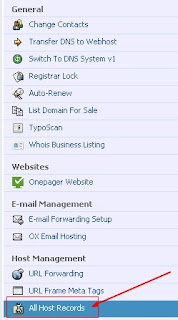
3.  Click on All Hosts Record located in left sidebar:
namecheap all hosts record

4. For the Host name @ record enter your domain including htttp:// and set the record type as URL redirect. example: http://www.site.com/.

5. For the second Host name record www enter ghs.google.com. and set the record type as CNAME.

6. Create 4 new A records in the sub domain settings. In the Host name section enter your naked domain like site.com without www. In the IP address field enter these IP addresses:

216.239.32.21
216.239.34.21
216.239.36.21
216.239.38.21

and click on save. Have a look at the screenshot:
How To Use NameCheap Domain On Blogger
Replace the http://www.site.com with your domain url. In the sub domain settings site.com will be replaced by your naked domain without http://www.

7. Click on save. Now wait for 10-20 minutes.
8. Now to go to your Blogger Dashboard and click on your blog settings.

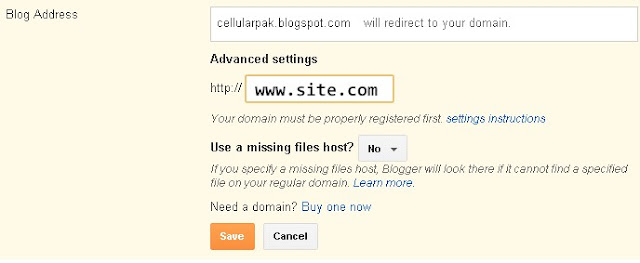
9. Under Publishing, click on add a custom domain. Then click on switch to advanced settings and enter your full domain url like www.site.com. Remember that entering naked domain will return an error. Click on save.
Blogger custom domain settings

10. After clicking on save you will be given a new CNAME record to verify your domain ownership. Now go to back to your NameCheap account and add a new CNAME record and enter the values given by blogger. The "*****.dv.googlehosted.com." will go to IP Address field and the second one in the Host Record.

11. Now go back to blogger settings and repeat the step 9.

12. That's it. Now you are done.

Now check if it is workin properly or not by opening your domain url. If it is showing any error then please note that it take 2-24 hours or even 2 days for the domain propagation to take place.

If you are facing any problems then comment below and I will try my best to solve them.

Top 5 Killer Tips To increase Blog Traffic

0 comments

Is Your blog traffic low?Do You want a flood of traffic to your Blog? Of course Yes,this is the major issue of all bloggers,they want to increase their website/blog traffic,they work hard but still they get only 100-200 page-views daily.Its actually due to some wrong steps,if you are one of that worried bloggers,then don,t worry you are at the right place.Here i will share some killer tips which will surely help you to boost up your blog traffic.Actually there are many method via which you can easily increase your Blog traffic but that traffic is still not sufficient,because hardly you can reach up to 500-100 page views.There are also some paid method i.e you have to pay for getting traffic,but that is not good for your blog/website.Paid traffic can harm your AdSense Earning and website reputation.So here is some killer tips which will surely enhance your Blog Traffic and Rank.


Top 5 Killer Tips To increase Blog Traffic

Increasing traffic is not the game of kids,but we are going to share some killer tips which will helps the newbies to increase their blog traffic along with high Page Rank.

  • As we all know very well,that social networks such as Twitter,Facebook,Pinterest etc are the most popular and high rank networks.So i will suggest you to never underestimate Social Networking websites.Always be in touch with your friends,followers and fans.You can make pages in Facebook,but remember many People have created some shit pages which is just for wasting time,but you will never do that,make a beautiful professional look page and after creating publish your blog contents there.By doing this i can guarantee that you will get huge traffic to your blog/websites.Next thing which is most common use pinterest for pinning your contents,according to bloggers in 2013 the pinterest is the most sophisticated source of getting unique visitors.Like wise twitter can now help you to boost your traffic i.e tweet your articles/blog contents with your fans and followers.In short Social Networking websites helps the Bloggers to get a huge amount of traffic to their blogs/websites.
  • Now let's strong the base of your blog/website by building back links.The Question arise is that How to Build Backlinks? So let me explain it.You can get backlinks to your blog/website by many ways,but the most common way every blogger is using is called commenting.Commenting is a process via which we share our ideas, thoughts and experience with other People.Bloggers also do comments on different contents such as blogging niche websites/blogs or any other tech blogs.By doing this you can get backlink by simply adding your blog/website link in comment box(remember never spam on Professional Blogs some time it can harm your website/blog) so be cooperative and social.Pass comments in a beautiful way to impress the admin and at last add your blog link.You can also create back links by writing articles,reviews and other information on directory websites which allow you to post for free.As a result of back-linking your blog will start getting organic traffic from Google and other Search engines and your blog/website page rank will increase quickly.
  • Another interesting and beautiful way to get traffic to your blog/website is from Forums.Sign up to the forums related to your blog niche.There you will get alot of opportunities to share your views.Users can ask you Questions,and you will have to answer them.So while answering them you can refer them to read your blog article.
  • Use Simple and Clean Blogger Template,you may have seen many blog which takes too much time to load. Therefore when some one visit that blog,he will never try to look back at that blog due to its loading speed.Actually the world is too much busy,no one wants to lose his/her time.Therefore i humbly request you that if you want traffic don,t install a boring template with many JavaScript widgets.Simplicity its self is beauty,according to this quote always be simple and creative,never add bullshit JavaScript widgets it slow down your blog speed.By doing this i guarantee you will get a flood of traffic to your blog/website.
  •  The last and most important tip is How To Write an Awesome Article to impress your Blog Visitors?So read the below tips for writing an awesome article.
  1. Always write according to your blog Niche.
  2. Never Copy the post,be original,don,t try to be copycat.
  3. Always write 300+ article(Remember the post doesn't depends upon the length but the thing is How You write,Write little but impressive and awesome article).
  4. Always be unique,don,t copy other bloggers style,You are different so challenge the world and become a Pro.
  5. Use images in Article,also do SEO(Search Engine Optimization)for images.
So What's up: All the above tips was in my mind if you have any idea,tips,and advice feel free to share with us :)

    Advertisement


    Copyright 2008 All Rights Reserved Revolution Two Church theme by Brian Gardner Converted into Blogger Template by Bloganol dot com